.png?width=200&height=103&name=CQ%20logo%20vert%20(2).png)

.png?width=475&height=245&name=CQ%20logo%20vert%20(2).png)
.png?width=400&height=207&name=CQ%20logo%20vert%20(2).png)
A Few Clicks Changed Everything: How One Chart Turned Growth into Gloom.

TLDR: Don’t trust the headlines, don’t trust graphs, and question the data.
Years ago, I read a few books by Edward R. Tufte about the Visual Display of Quantitative Information. I learned to always question graphs. A natural extension of that is that I always question headlines and social media posts that present data.
On Friday an article came across my feed. “US GDP growth disappoints to cap 2025. Trump blames government shutdown.”
The title implies that GDP is bad. The addition of Trump into the title and story was likely to get clicks.
The article points out that GDP did grow, just not as much as expected. According to the piece, economists had forecast 2.9% growth, but the actual annualized rate came in at 1.4% — hence the 'disappoints' in the headline.
If you read the article, you eventually get to a graph (Image 1) similar to the one below that clearly shows GDP is down.
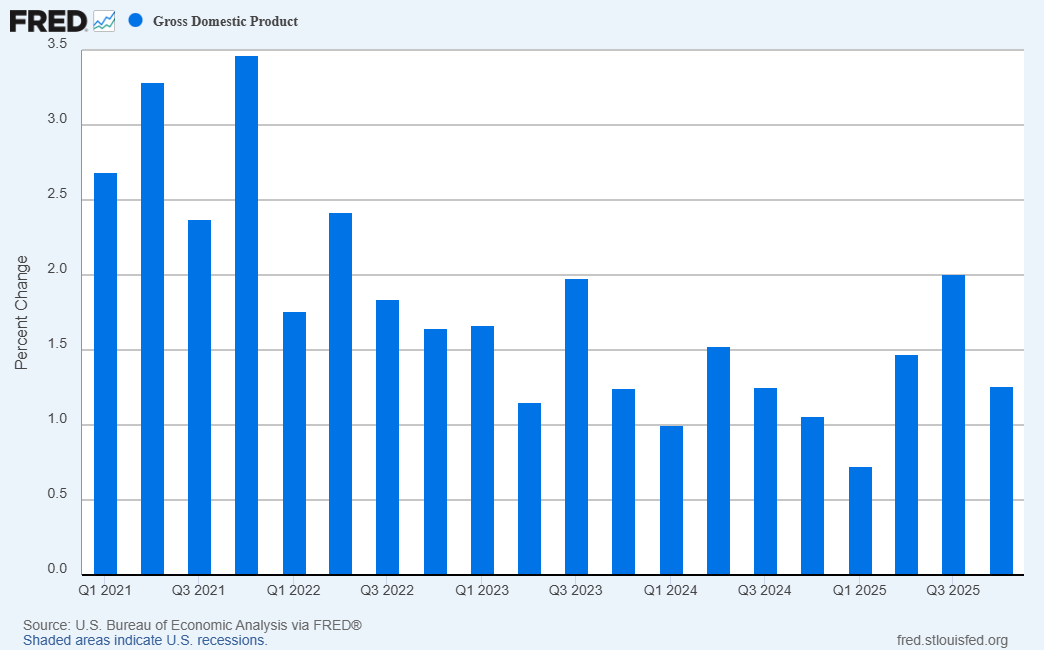
Image 1: Recreation of the Yahoo chart using FRED website graph tools.
Yet when you go to the FRED site (https://fred.stlouisfed.org/series/GDP#) you will see a different default view. They show the following default graph (Image 2).
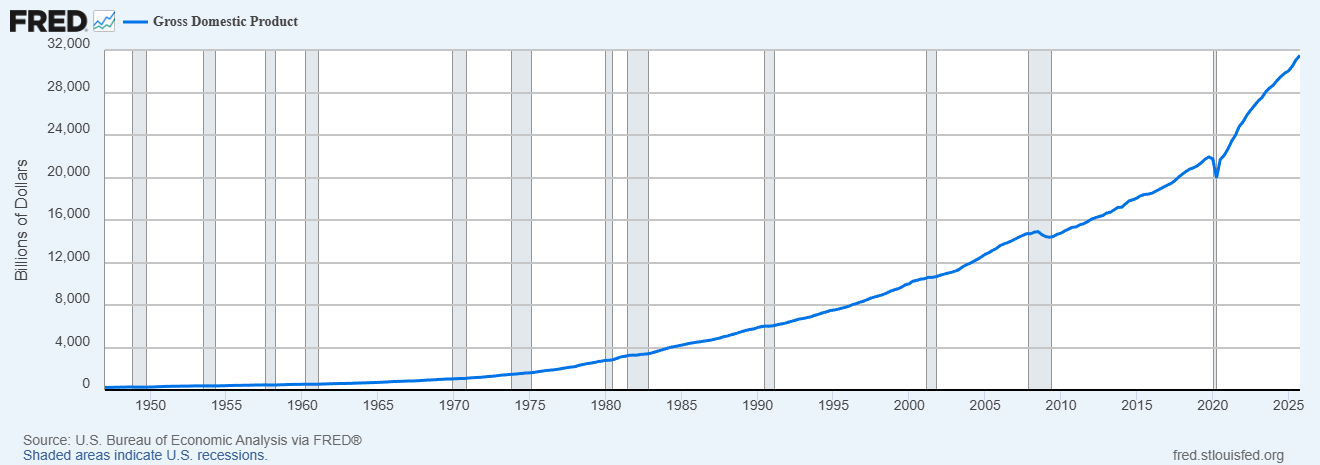
Image 2: Default graph from the FRED
This full graph, that hasn’t been manipulated, shows GDP continuing to grow. It implies a different story, doesn’t it?
To recreate the Image1 graph I had to manipulate the graph on the FRED’s site. It took me a few minutes to change:
- Line chart to bar graphs
- Raw GDP to percentages
- Modify the time scale to only 2021 and beyond
- Modify the size of the Y axis (and not the x axis) to exaggerate the change in numbers
It wasn’t the default way of seeing the data, and it makes me wonder why it was manipulated.
Does one’s perception change if the time scale is increased on the manipulated graph? Image 3 graph adds in 2019 and 2020.
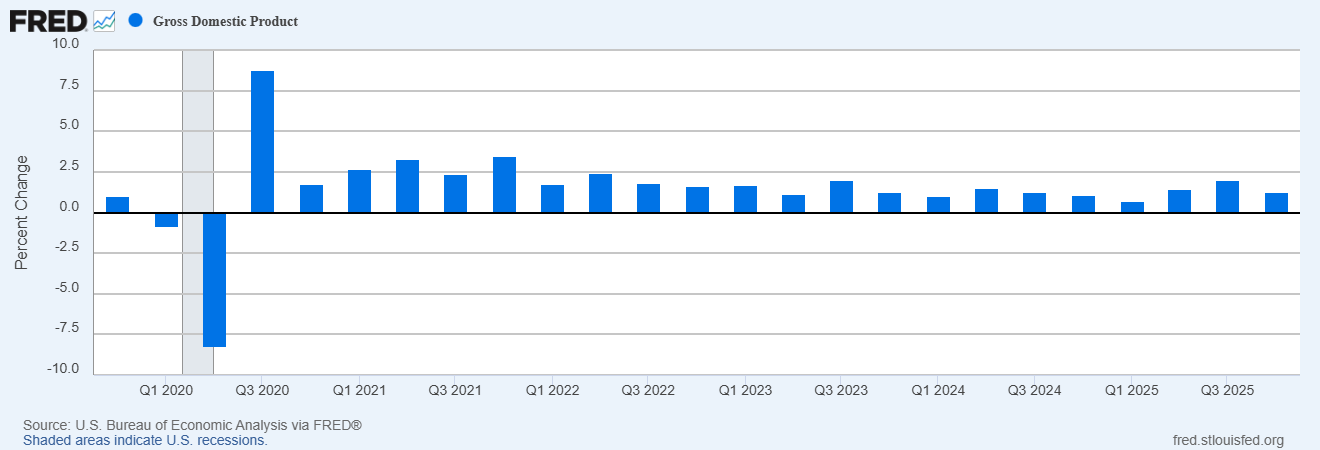
Image 3: expanding the time frame
In this graph, the latest percentage does not look so stark. It is barely noticeable, and being above the line makes it look better than before.
In this example, I changed the graph and am also guilty of changing perceptions.
Looking at the data myself...
I pulled the data using CloudQuant Data Liberator and analyzed the raw data.
I added:
- My own calculation for GDP Percentage Growth
- A 20-period Simple Moving Average on GDP Percentage Growth
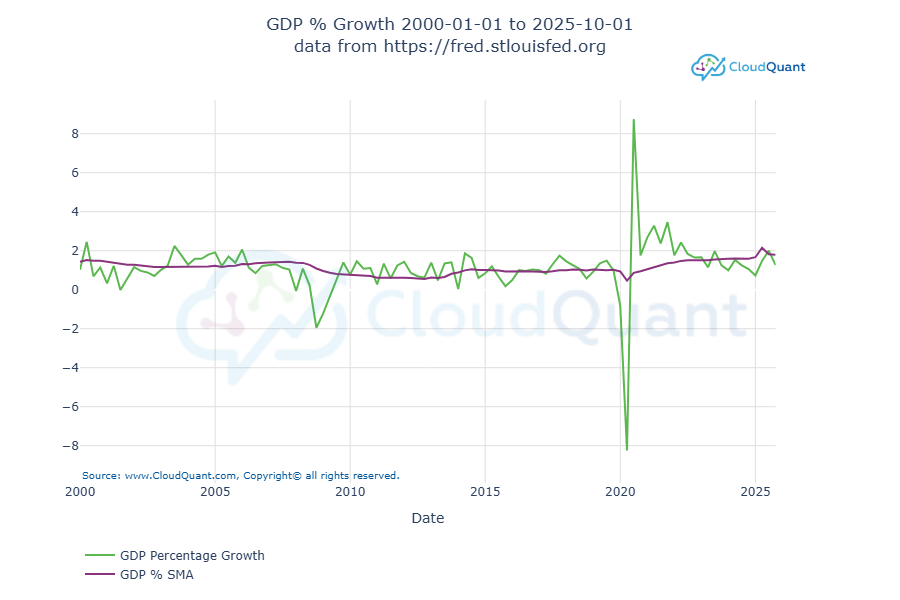
This chart shows that the current GDP (1.261%) is only slightly less than the Simple Moving Average (1.792%).
Conclusions
- Data and graphs need to be examined and not taken on face value.
- Always look at the time-series data
- The original author may be telling you a story
- You may (or may not) agree with that story after looking at the data
- Draw your own conclusions, don’t rely on the headlines
- Question the graphs
Appendix: The Data
Source: https://fred.stlouisfed.org/graph/fredgraph.csv?id=GDP
Filtered to 1/1/2019 and beyond.
|
observation_date |
GDP |
GDP Percentage Growth |
GDP % SMA |
|
1/1/2019 |
21111.6 |
0.926 |
1.031 |
|
4/1/2019 |
21397.94 |
1.356 |
1.006 |
|
7/1/2019 |
21717.17 |
1.492 |
0.999 |
|
10/1/2019 |
21933.22 |
0.995 |
1.018 |
|
1/1/2020 |
21751.24 |
-0.83 |
0.935 |
|
4/1/2020 |
19958.29 |
-8.243 |
0.463 |
|
7/1/2020 |
21704.44 |
8.749 |
0.867 |
|
10/1/2020 |
22087.16 |
1.763 |
0.946 |
|
1/1/2021 |
22680.69 |
2.687 |
1.056 |
|
4/1/2021 |
23425.91 |
3.286 |
1.17 |
|
7/1/2021 |
23982.38 |
2.375 |
1.24 |
|
10/1/2021 |
24813.6 |
3.466 |
1.361 |
|
1/1/2022 |
25250.35 |
1.76 |
1.399 |
|
4/1/2022 |
25861.29 |
2.42 |
1.479 |
|
7/1/2022 |
26336.3 |
1.837 |
1.506 |
|
10/1/2022 |
26770.51 |
1.649 |
1.501 |
|
1/1/2023 |
27216.45 |
1.666 |
1.511 |
|
4/1/2023 |
27530.06 |
1.152 |
1.507 |
|
7/1/2023 |
28074.85 |
1.979 |
1.553 |
|
10/1/2023 |
28424.72 |
1.246 |
1.587 |
|
1/1/2024 |
28708.16 |
0.997 |
1.59 |
|
4/1/2024 |
29147.04 |
1.529 |
1.599 |
|
7/1/2024 |
29511.66 |
1.251 |
1.587 |
|
10/1/2024 |
29825.18 |
1.062 |
1.59 |
|
1/1/2025 |
30042.11 |
0.727 |
1.668 |
|
4/1/2025 |
30485.73 |
1.477 |
2.154 |
|
7/1/2025 |
31098.03 |
2.008 |
1.817 |
|
10/1/2025 |
31490.07 |
1.261 |
1.792 |
I calculated the GDP Percentage Growth and GDP % SMA myself using the following calculations in python:
df["GDP Percentage Growth"] = df["GDP"].pct_change() * 100
df['GDP % SMA'] = df['GDP Percentage Growth'].rolling(window=20).mean()
Comments